



We’re excited to introduce a powerful new feature in FlexDeploy 10.0: In-App Notifications! This enhancement will keep you informed and responsive without ever leaving the FlexDeploy interface.
What Are In-App Notifications?
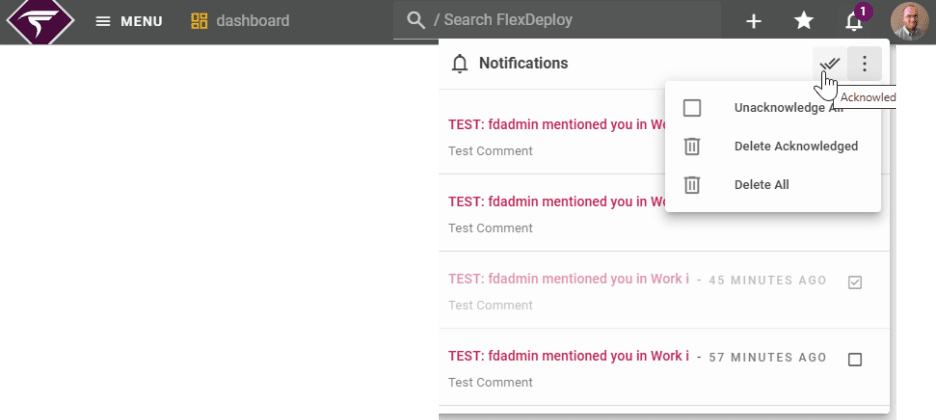
With FlexDeploy 10.0, you can now receive in-app notifications alongside traditional email notifications. This gives you the flexibility to stay updated in real time, directly within the application.
Manage Notifications with Ease
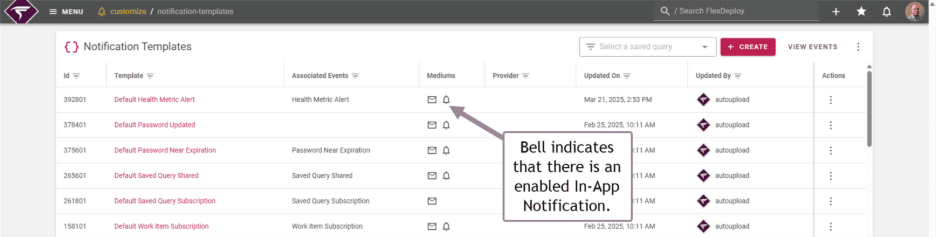
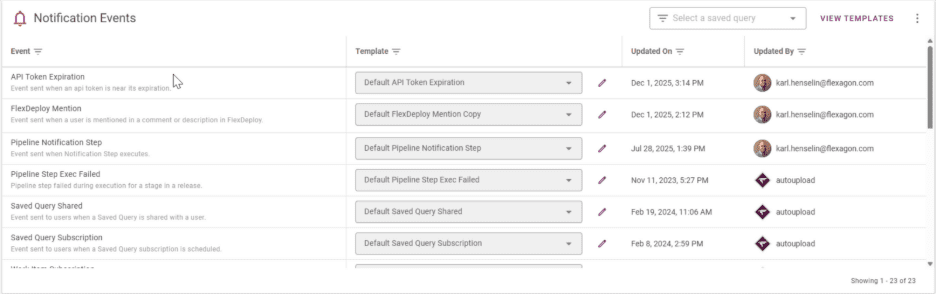
FlexDeploy 10.0 includes a new notification management screen that lets you:
- View notification events and their assignments at a glance.
- Verify that all events are properly assigned.
Streamline Notification Handling
- Automatic Purging: FlexDeploy automatically removes notifications after a set period, whether you’ve read them or not.
- Acknowledgment Options:
- Mark notifications as acknowledged individually or in bulk.
- Delete all notifications or only those you’ve acknowledged.
Why In-App Notifications Matter
Here’s why this feature will transform how you stay informed:
- Stay Updated Without Leaving FlexDeploy: Notifications appear directly in the application, so you don’t need to switch to your email.
- Cut Down on Email Clutter: Important updates are available in-app, reducing the noise in your inbox.
- See Alerts Instantly: Get real-time visibility into critical actions and events.
Key Benefits of In-App Notifications
- Dual-Channel Communication: Choose between email, in-app notifications, or both to suit your workflow.
- Seamless User Experience: Access notifications directly in the FlexDeploy interface for quick and easy updates.
- Actionable Alerts: Jump straight from a notification to the relevant page or action, saving you time and effort.
Examples of In-App Notifications
Here are some key events that will trigger in-app notifications in FlexDeploy 10.0:
- Deployment Status Updates: Stay informed about the progress of your deployments.
- Approval Requests: Get notified when your approval is needed.
- Work Item Mentions: Receive alerts when you’re mentioned in a work item.
- Password Expiration Alerts: Be notified when your password is about to expire or has been updated.
- Health Monitoring Alerts: (When configured) Get real-time updates on system health.
- Plugin Activation Updates: Know instantly when a plugin activation succeeds or fails—no need to refresh the page.
Coming Soon
FlexDeploy 10.0 will make staying connected and responsive easier than ever. Watch for the release notes and a quick guide to help you configure your notification preferences.