



FlexDeploy 10.0 is bringing a highly anticipated feature: Script History! This new capability makes managing, tracking, and restoring scripts easier than ever.
What’s New in Script History?
With Script History, FlexDeploy saves a revision of your scripts and text area inputs every time you click save. This powerful feature allows you to:
- View Previous Versions: Access older versions of your scripts with ease.
- Compare Changes: Use the built-in diff tool to see exactly what changed.
- Restore Versions: Revert to any previous version with a single click.
How to Use Script History
- Click the Version History icon in the top-right corner of the editor.
- A screen will appear, showing all saved versions of your script.
- Select versions to compare on the left and right panels.
- Restore any version directly into the editor.

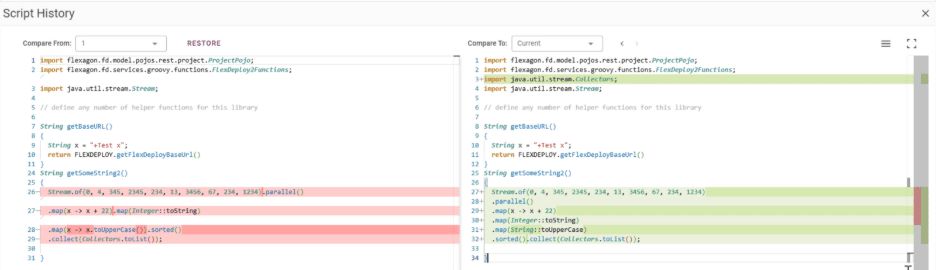
You can choose which versions to see on the left and right and restore any version into the editor.
Current in the drop down refers to the version in the editor.
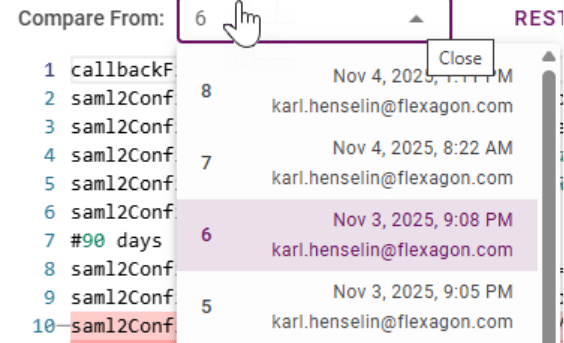
Each version clearly displays who made the change and when it happened, giving you full visibility into your script’s history.
After restoring a version, close the popup by clicking the X in the top-right corner. Review the script, and if you’re happy with the changes, click Save to finalize it.
Where Script History Works
FlexDeploy 10.0 supports Script History for:
- SSO Realm Configuration
- Pipeline Groovy Scripts
- Preconditions
- Webhook Scripts and Scheduled Events
- Groovy Libraries
- Custom Integration Providers
- And more!
This feature enhances the previous draft functionality by providing a complete historical view of your scripts over time.
Why Script History Matters
Script History delivers significant benefits for teams and individuals:
- Confidence in Changes: Make updates without worrying about losing a working version.
- Auditability: Track who made changes and when, ensuring accountability.
- Consistency: Enjoy built-in version control, similar to workflows and pipeline definitions.
Key Benefits of Script History
- Built-In Versioning: Eliminate the need for external tools or copying scripts into Notepad before making changes.
- Quick Recovery: Roll back to a previous version in seconds.
- Better Collaboration: Review changes as a team to understand why something started or stopped working.
Coming Soon
FlexDeploy 10.0 makes script management smarter, safer, and more efficient. With Script History, you can confidently manage your scripts, track changes, and collaborate effectively. Stay tuned for the release and start simplifying your script management process!